


KRUU
4.942.00 Reviews
App Specs
- Version
- 3.6.3
- Updated On
- License
- Free
- Downloads
- 500,000+
- Developer
- KRUU GmbH
- Categories
- Events
- Platform
- Android, iOS
Screenshots


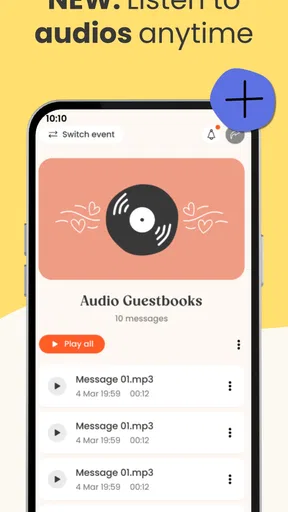
 Analysis by AppCompare
I would judge an event app by a simple test: does it make the plans easier before the day, and the memories easier to keep afterward? KRUU is presented as a tool for the whole arc of an occasion, from organizing it to looking back on it. That focus is useful, but it also means it is best considered as an event companion rather than a general social network or a complete replacement for every planning tool.
What “free” tells you—and what it doesn’t
KRUU is a free app in the Events category, developed by KRUU GmbH. That makes it easy to try without deciding whether an upfront purchase is worthwhile. I’d treat that as a low-risk starting point, not as a promise that every service connected to an event is free: the app’s free status alone doesn’t establish the cost of any separate event-related products or services.
That distinction matters when you’re planning with a group. I would use the app to see whether its approach suits the occasion, then check the terms of anything specific I intended to order or arrange before committing. The practical value is in having an event-focused place to begin; it isn’t a reason to assume that every possible next step comes at no cost.
Where the event focus can pay off
The strongest case for KRUU is when an occasion has enough moving parts that scattered chats and reminders become tiring, but doesn’t call for a heavyweight project-management setup. A family gathering, a birthday, or a get-together with friends can involve a host, several guests, and decisions that need to be remembered. An app built around events gives those plans a more natural home than a long message thread where details quickly get buried.
That doesn’t mean I’d move every conversation into a new app. A useful workflow is to keep casual back-and-forth in the channel everyone already checks, while using an event-focused tool for the parts that benefit from being gathered together. Before inviting people, I’d decide what the app is meant to hold and tell the group plainly; otherwise, guests may continue asking questions in the old chat and the organizer ends up maintaining two versions of the plan.
For a realistic example, imagine arranging a family celebration with relatives who live in different places. I’d first settle the core details with the people making decisions, then bring the wider group into the event space once the plan is coherent enough to share. That order reduces the chance of guests seeing unfinished arrangements, and it gives latecomers one clear place to catch up instead of asking the host to repeat every detail.
How I’d compare it with familiar alternatives
A group chat is still the easiest choice when everyone is already there and the plan is simple. It has almost no learning curve, but important information can disappear beneath jokes, reactions, and unrelated messages. A calendar is better for keeping a date visible and avoiding schedule clashes, yet it is not automatically a comfortable place to coordinate the social side of an occasion. A general task manager can handle responsibilities, though it may feel like overkill for a casual gathering.
Worth Reading Before You Choose

Baby Panda World Brings Quick Play to Modern Phones, but Its Game Library Feels Busy

ESPN’s Live Game View Makes Following Close Games Easier

QuizzLand Review: A Good Fit for Short Trivia Breaks, Not Every Player

Basketball Stars: Multiplayer Is Fast, but Can It Recover When Matches Go Wrong?

WEBTOON Turns Phone Updates Into a Better Reading Routine

Link to Windows Runs on Shared Habits, Not Social Feeds
KRUU’s appeal is the event-first framing: it is intended to support planning and remembering an occasion, rather than just scheduling a time or exchanging messages. I’d choose it when that single-event context helps the group stay oriented. I’d stick with a chat and calendar when the gathering is straightforward, guests resist installing apps, or the only real need is to agree on a date. The best tool is the one the whole group will actually use, not the one with the most ambitious premise.
Small choices that make the workflow smoother
One useful habit is to name the event clearly and keep its purpose narrow. If a gathering grows into several separate plans, bundling everything together can make it harder for guests to find the information they need. I’d also settle the basic decisions before sending invitations, then use the event space for the shared plan rather than turning it into a second general-purpose chat.
Another trade-off is inclusion. Some guests may be comfortable installing an app; others may prefer a familiar message or a phone call. Before building the whole plan around KRUU, I’d check how the group communicates and make sure the essential details can reach anyone who won’t use it. That small check prevents the organizer from mistaking an app setup for actual coordination.
Who is likely to get the most from it
KRUU makes the most sense for people who regularly bring groups together and want an event-oriented place to organize the experience, not merely post about it afterward. It may also suit a host who is tired of answering the same logistical questions across several conversations. With a 4.8 average from around 2.4 thousand ratings and more than 100 thousand installs, it has attracted a substantial audience, though those figures can’t tell you whether its approach fits your particular circle.
I’d be less inclined to recommend it to someone who rarely organizes events, already has a routine that works, or needs every guest to participate without installing anything new. It also isn’t a substitute for a dedicated professional event-management system when the occasion involves complex responsibilities or formal coordination. For a small, informal gathering, simpler tools may be quicker; for a larger or more demanding event, a specialized service may be a better match.
The app is free, rated Teen, and its current version is 3.4.0; it was released on March 29, 2023, and requires Android 7.0 or later. Those details help with basic suitability, but the more important question is whether your guests will join in. I’d check the app on the device you plan to use and decide how you’ll share the essentials with anyone who prefers not to participate through it.
Picture this: you're ready to spice up your social media game, and you stumble upon KRUU. It's like finding a hidden gem in the app store! So, I decided to dive in headfirst and see what all the buzz was about.
Getting Started with KRUU
First things first, downloading KRUU was a breeze. It's available for both Android and iOS, so no one’s left out of the fun. Once installed, the interface was clean and inviting. It kinda felt like walking into a trendy café where the ambiance is just right.
The sign-up process was straightforward. You can either create a new account or, if you're a bit lazy like me, just use your existing social media accounts to sign in. I love apps that save me from the hassle of remembering yet another password!
Exploring Features
Now, onto the good stuff—what makes this app stand out from the crowd? Well, KRUU is all about creativity and connection. It's designed to let you share, discover, and engage with content effortlessly. Think of it as a mix between Instagram and TikTok, but with a unique twist.
The app offers a variety of tools to create engaging content. You can shoot videos, add funky filters, and even play around with some pretty cool editing features. There's something liberating about being able to express yourself so freely. Plus, the app makes it super easy to share your masterpieces with friends or the world.
The Community Vibe
What struck me the most was the vibrant community. It's not just about posting content; it's about engaging with a network of like-minded individuals. The app encourages interactions through comments, likes, and shares, creating a sense of camaraderie that’s often missing in other platforms.
I found myself scrolling through the Discover section, where you can find trending content tailored to your interests. It's like the app knew exactly what I wanted to see. Creepy or convenient? You decide!
User Experience
Navigation within the app is smooth as silk. The icons are intuitive, so you won’t find yourself fumbling around trying to figure out what button does what. Everything is where you expect it to be, which makes the user experience top-notch.
The app also runs seamlessly, with minimal lag. Even when I was juggling multiple tasks on my phone, KRUU held its own without a hitch. That's a big win in my book!
A Few Quirks
Of course, no app is perfect. I did notice that the app occasionally took its sweet time loading some features, especially when my Wi-Fi decided to act up. But hey, nothing a quick refresh couldn’t fix.
Another thing was the occasional ad popping up. While not overly intrusive, they did break the flow a bit. But considering the app's quality, it’s a small price to pay.
Final Thoughts
All in all, KRUU is a fantastic app for anyone looking to up their social media game. It's fun, engaging, and packed with features that make content creation a joy rather than a chore. Whether you're an aspiring content creator or just someone who loves to share moments, this app is definitely worth checking out.
So, there you have it! Give KRUU a whirl, and let me know what you think. Who knows, it might just become your new favorite app, as it has for me!
Pros
- User-friendly interface for easy navigation.
- Customizable themes for a personal touch.
- Seamless integration with social media.
- Offline mode available for convenience.
- Regular updates with new features.
Cons
- Limited free version with essential features.
- Occasional ads can interrupt user experience.
- Requires high storage space on devices.
- Some features need a stable internet connection.
- Customer support response can be slow.
FAQs for KRUU
What is KRUU and what does it offer?
KRUU is a versatile app designed to enhance your social media experience by offering unique editing tools and creative features for content creation. It allows users to edit photos and videos with a wide array of filters, effects, and templates, making it ideal for influencers and casual users alike. The app aims to streamline the process of creating eye-catching content for platforms like Instagram, TikTok, and Snapchat.
Is KRUU free to use, or does it require a subscription?
KRUU is available as a free download with basic features accessible to all users. However, to unlock the full potential of the app, including premium filters and advanced editing tools, users can opt for a subscription plan. This subscription offers additional benefits and exclusive content, making it a worthwhile investment for serious content creators.
Which platforms is KRUU compatible with?
KRUU is compatible with both Android and iOS devices, ensuring a wide range of users can access its features. The app is optimized for the latest versions of these operating systems, but it also supports older versions, ensuring that users with different devices can enjoy a seamless experience.
How user-friendly is KRUU for beginners?
KRUU is designed with user-friendliness in mind, offering an intuitive interface that guides beginners through the editing process with ease. The app includes helpful tutorials and tips, making it accessible to users with varying levels of experience. Whether you're a novice or a seasoned editor, KRUU provides the tools and guidance needed to create stunning content.
Does KRUU offer customer support in case I encounter issues?
Yes, KRUU provides comprehensive customer support to assist users with any issues they might encounter. Users can access a detailed FAQ section within the app, and contact support through email or live chat for personalized assistance. The support team is dedicated to ensuring a smooth and satisfactory user experience.


